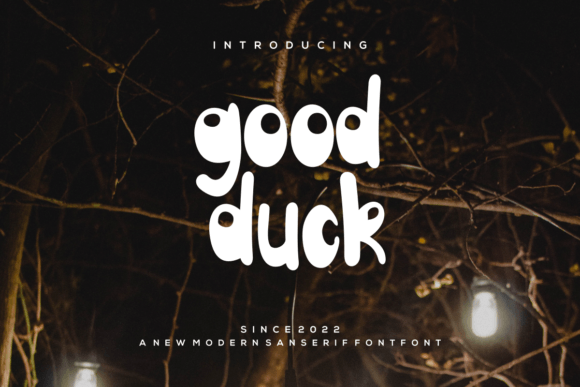
Goodduck: A Playful and Classy Display Font for Modern Design
If you're looking for a font that blends elegance with a touch of whimsy, Goodduck might just be the perfect fit for your next project. This display font is known for its sweet and playful style, making it ideal for branding, logos, headlines, and other creative applications where a unique personality is needed. But while Goodduck offers a lot of charm, it's important to understand how to use it effectively to avoid common pitfalls.
Goodduck retains its calligraphic roots, giving it a refined feel that can elevate any design. However, this doesn't mean it's suitable for every situation. Understanding when and how to use it can make a big difference in the final outcome of your work.
Common Mistakes When Using Goodduck
One of the most frequent mistakes people make with Goodduck is using it in large blocks of text. While the font looks great in headlines or short phrases, it can become difficult to read when used for body copy. This is because the intricate details and flourishes that give Goodduck its character can interfere with legibility, especially at smaller sizes.
Another common mistake is not considering the context of the design. Goodduck has a very specific tone—playful, elegant, and slightly retro. If your project requires a more serious or modern look, this font might not align with the overall message you're trying to convey. For example, using Goodduck on a financial services website could confuse visitors about the professionalism of the brand.
Some users also overlook the importance of proper spacing and kerning when working with Goodduck. The font’s unique shapes may require adjustments to ensure that letters don’t appear too close or too far apart. Without careful attention to these details, the design can look unbalanced or unprofessional.
How to Avoid These Mistakes
To get the best results with Goodduck, start by using it in small doses. Focus on headlines, logos, or decorative elements rather than long paragraphs. This allows the font to shine without compromising readability. For instance, a logo using Goodduck can add a distinctive flair, while the rest of the design uses a more standard typeface for clarity.
Before choosing Goodduck, ask yourself whether it fits the tone and purpose of your project. If you're designing for a children's product, Goodduck could be an excellent choice. But if you're creating content for a law firm or a corporate presentation, it might not be the best option. Always consider the audience and the message you want to send.
When working with Goodduck, take the time to adjust spacing and alignment. Many design programs allow for fine-tuning of letter spacing and kerning. Experiment with different settings to find what works best for your layout. This small effort can significantly improve the visual appeal of your work.
What to Check Before Using Goodduck
Before downloading or purchasing Goodduck, make sure you understand the licensing terms. Some fonts come with restrictions on commercial use, which could limit how you apply them in professional projects. Always review the license agreement to avoid legal issues down the line.
It's also a good idea to test Goodduck in different sizes and formats. View it on various devices and screen resolutions to see how it performs. What looks great on a desktop monitor might not translate well to a mobile screen. Testing ensures that your design remains consistent across platforms.
Finally, consider how Goodduck interacts with other elements in your design. It should complement the overall aesthetic rather than clash with it. Pairing it with a clean, sans-serif font can create a nice contrast, while using it alongside other decorative fonts might lead to visual clutter.
Realistic Examples and Better Approaches
Imagine you're designing a wedding invitation. Goodduck could be a fantastic choice for the main heading, adding a touch of romance and elegance. However, using it for the venue details or RSVP information would be impractical. Instead, pair it with a simpler font for the body text to maintain clarity and readability.
Another example is a social media post for a boutique coffee shop. Using Goodduck in the headline can draw attention and reflect the shop's quirky personality. But if the post includes a long description, switching to a more readable font would help keep the audience engaged.
For a blog post, consider using Goodduck only for the title and subheadings. This approach highlights the font's strengths while keeping the rest of the content easy to read. It also helps maintain a professional appearance without overwhelming the reader.
Final Thoughts on Goodduck
Goodduck is a versatile and charming font that can add personality to your designs when used correctly. By avoiding common mistakes and following practical advice, you can maximize its potential while maintaining a polished and professional look. Whether you're a designer, marketer, or entrepreneur, understanding how to use Goodduck effectively can help you create more engaging and visually appealing work.
Take the time to explore its possibilities, test it in different scenarios, and make informed decisions about its use. With the right approach, Goodduck can become a valuable tool in your design arsenal, helping you stand out in a competitive market.